Chat with your agent
Chat with any agent in the local Agent Adapter page, and watch it work: streamed text, tool calls, approvals, the flow graph, a timeline, state and cost for every turn. It works with any framework or none, offline, on 127.0.0.1 only.
Try it here
This is the real chat page, replaying recorded turns of examples/chat_flows.py. Pick a
question: its tool cards, approval and answer play out while the graph, timeline, events,
state and cost fill in. Nothing runs here; run python examples/chat_flows.py to chat live.
Open the demo full screen. Its five flows, one per agent pattern, are explained in Chat flows by example.
sequenceDiagram
  participant B as Browser (chat page)
  participant S as agent-adapter ui
  participant A as your agent
  participant E as Executor
  B->>S: POST /api/chat/sessions/{id}/turns
  S->>A: agent(message, session)
  A->>E: executor.run(tool, ctx=session.context())
  E->>S: events, also recorded to the runs folder (Graph, Timeline, State, Cost)
  S-->>B: tool and approval cards (SSE stream)
  B->>S: Approve or Deny (one use)
  S-->>B: the agent's text chunks, then done: answer, tokens, cost
Start it: agent-adapter ui or serve()
The smallest agent is one function. Save it as app.py and run python app.py, or start
the page with agent-adapter ui --agent app:chat:
from agent_adapter.viewer import ChatMessage, ChatSession, serve


async def chat(message: ChatMessage, session: ChatSession) -> str:
    """Answers each message; `session.history` holds the earlier turns."""
    return f"You said: {message.text}"


if __name__ == "__main__":
    serve(agent=chat)  # blocks; prints the link and opens the page on 127.0.0.1:8780
agent-adapter ui --agent app:chat                        # chat with any agent
agent-adapter ui --agent app:chat --tools app:registry   # ...whose session.executor runs these tools
agent-adapter ui --model app:model --tools app:registry  # the built-in tool loop
Targets are module.path:attribute, imported from the current folder. Options:
--executor app:executor, --system TEXT and --max-steps 8 (built-in loop),
--turn-timeout 300, --approval-timeout 600, --reviewer local, --chat-dir DIR
(default .agent_adapter/chats). Without --agent or --model, the Chat tab says how to
add one. serve(...) takes the same options (registry= is --tools; also folder=, port=8780,
open_browser=True, stream=True), prints the link and blocks until Ctrl+C.
To recall what a user said in earlier chats, see Remember users across chats.
The agent contract
agent(message, session) may be async or sync (a sync one runs in a thread). It returns
the answer as a str, or an async iterator of text chunks, which stream.
| Name | Holds |
|---|---|
message.text, message.attachments |
the user's text; Attachment(name, media_type, size, path) with read_bytes(), read_text() |
session.id, session.history |
the chat id; earlier finished turns as Messages |
session.state |
a dict the page shows and can edit before a turn; changes are kept |
session.executor, session.context() |
the host's executor; pass ctx=session.context() so tool calls join this turn's run and show as cards |
session.run_id |
this turn's run in the Runs view |
An exception ends the turn as failed: an AdapterError shows its kind and message, any
other only its type name. A turn cut off by a server stop ends stopped with the kind
interrupted. A fuller agent (examples/chat_any_agent.py) runs a flow in the turn, with
FlowRunner(trace_state=True) so the State tab shows values, and streams:
async def chat(message: ChatMessage, session: ChatSession) -> AsyncIterator[str]:
    """Runs the flow in this turn's run, then streams the answer word by word."""
    session.state["questions"] = session.state.get("questions", 0) + 1  # editable in the page
    runner = FlowRunner(session.executor, trace_state=True)  # trace_state fills the State tab
    result = await runner.run(visit_flow, {"question": message.text}, ctx=session.context())
    for word in result.state.answer.split(" "):
        yield word + " "
        await asyncio.sleep(0.02)


serve(agent=chat, registry=registry, port=8780, open_browser=True)  # blocks until Ctrl+C
LangGraph, ADK, CrewAI or an HTTP backend: Wrap a framework for chat.
The built-in tool loop
--model and --tools run run_tool_loop over your model and registry, streaming when
the model can; serve(stream=False) calls generate instead, so a response cache applies.
The host's executor allows 50 tool calls per turn unless you pass your own. Text files
(UTF-8, up to 64 KB) are added to the message; other files need --agent.
model = CallableModel(scripted_model, provider="local", model="scripted")
executor = Executor(registry, ledger=Ledger(prices=PRICES), limits=RunLimits(max_calls=20))
serve(
    model=model,
    registry=registry,
    executor=executor,  # optional: here it adds prices, so the Cost tab shows dollars
    system="You help plan a day out.",
    port=port,
    open_browser=open_browser,
    out=out,
)
Using the page
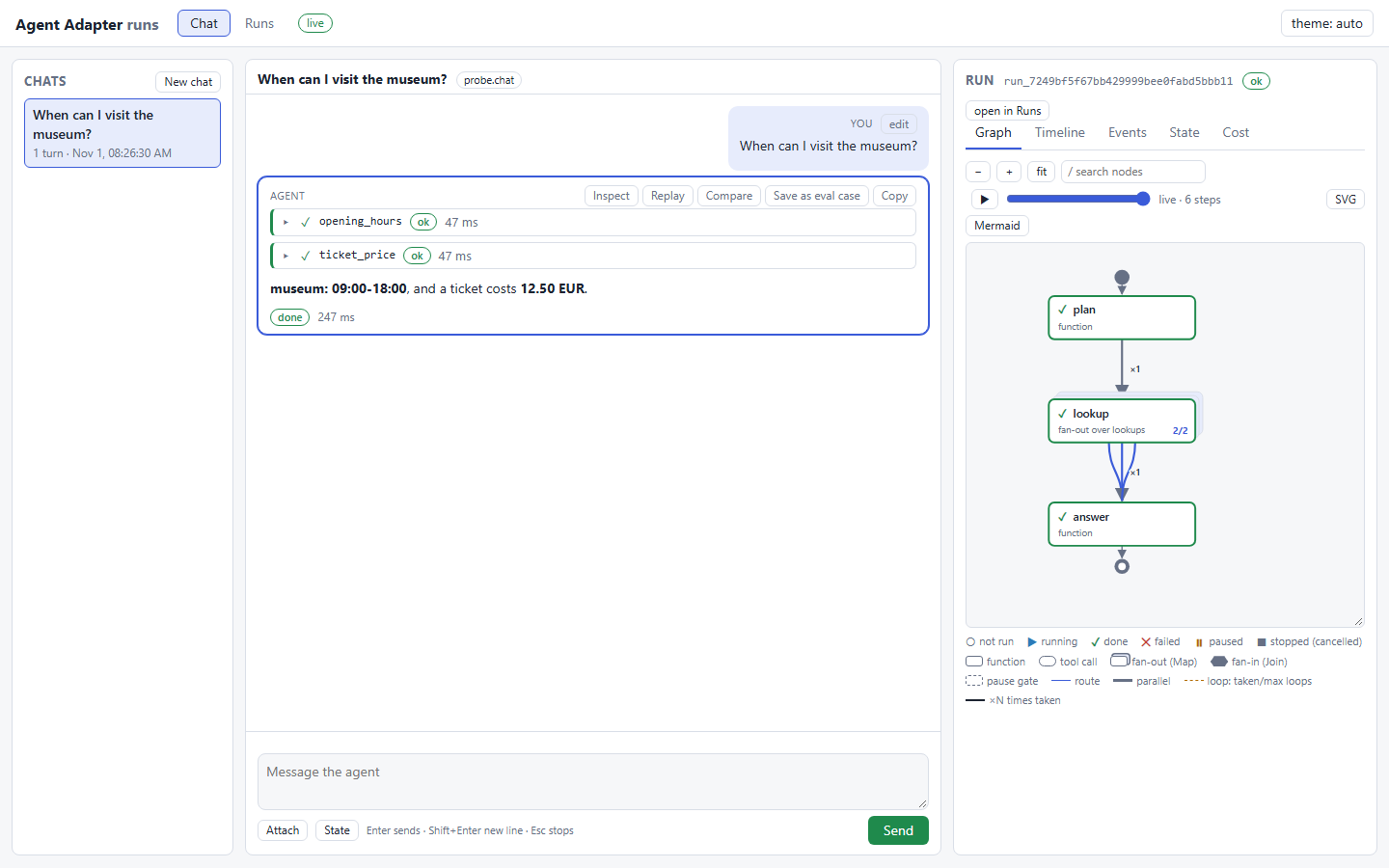
The demo above is this page. Chats sit on the left, the conversation in the middle, and the
selected turn's run on the right, with the Runs view's tabs; the Events tab filters by node,
tool, kind or text. python examples/chat_builtin.py runs the built-in loop live:
| Part | Does |
|---|---|
| Conversation | streamed Markdown (code blocks with copy, lists, tables, links); tool and approval cards |
| Composer | Enter sends, Shift+Enter adds a line, Esc stops the turn; Attach or drop files; State edits session.state (JSON) before the next turn |
| Turn menu | Inspect, Replay, Compare, Save as eval case, Copy; edit on your message resends it in a new branch |
| Inspector | Graph, Timeline, Events, State and Cost of the selected turn's run, live; "open in Runs" shows the full run |
- Approvals. A
confirm=Truecall waits for Approve or Deny in its card, decided as--reviewer; a decision is used once. Stop, the turn timeout or--approval-timeoutdeny it. An--executorwith its own approval port keeps that port. - Files. Up to 10 MB each and 50 MB per chat: text, JSON, PNG, JPEG, GIF, WebP, PDF. The server checks the bytes, not the name; the page checks sizes before sending.
- Replay runs the same input, and edit your edited text, on the same earlier
history in a new branch. Compare shows answer, tool calls, tokens, cost, duration and
steps of two turns. Eval cases append
{id, input, expected, tags}to<chat-dir>/eval_cases.jsonlforoptimiser.cases.load_cases(Optimise your agent). Graph controls: Navigate the graph.
Security and storage
Chat runs your agent and its tools inside the ui process, so it is off unless you pass
--agent or --model, and start-up logs a WARNING. Every tool call goes through the
executor (validation, approvals, limits, ledger). The token, Origin, CSRF and loopback rules
of See your runs apply to every request.
- Anyone with the printed link can chat and decide approvals as
--reviewer: keep it private. serve(open_browser=True)opens a one-use launch link, valid for 60 seconds. On a shared machine another local user could read it from the browser's command line before the browser uses it; if your own browser then shows the link as expired, restart the viewer (the server logs a WARNING).- Chats are stored unmasked in the chat folder: messages, answers, uploads and session
state (the page shows secret-named state keys as
***). Treat the folder as data. Turns are recorded to the runs folder withcapture_content=False. - A sync agent that blocks past
--turn-timeoutends the turn, but its worker thread runs on until the call returns. Prefer async agents or give your calls their own timeouts.
Files
| File | Does |
|---|---|
examples/chat_minimal.py, chat_builtin.py, chat_any_agent.py, chat_flows.py, chat_wrappers.py |
the smallest agent; a scripted model with a tool to approve (--check runs one turn offline); a plain agent running a flow; the demo's help desk, one flow per pattern; framework wrappers |
agent_adapter/viewer/chat/ |
contract, built-in agent, turn host, sessions, files, approvals, memory, routes |
agent_adapter/viewer/static/chat*.js, markdown.js, inspector.js |
the page: conversation, stream reader, safe Markdown, inspector |